Tool ID
Check out the EcoSystem Compatibility Support materials for details such as the Tool ID RASIC, Implementation Guide, Design Specs, and more.
Platform Overview
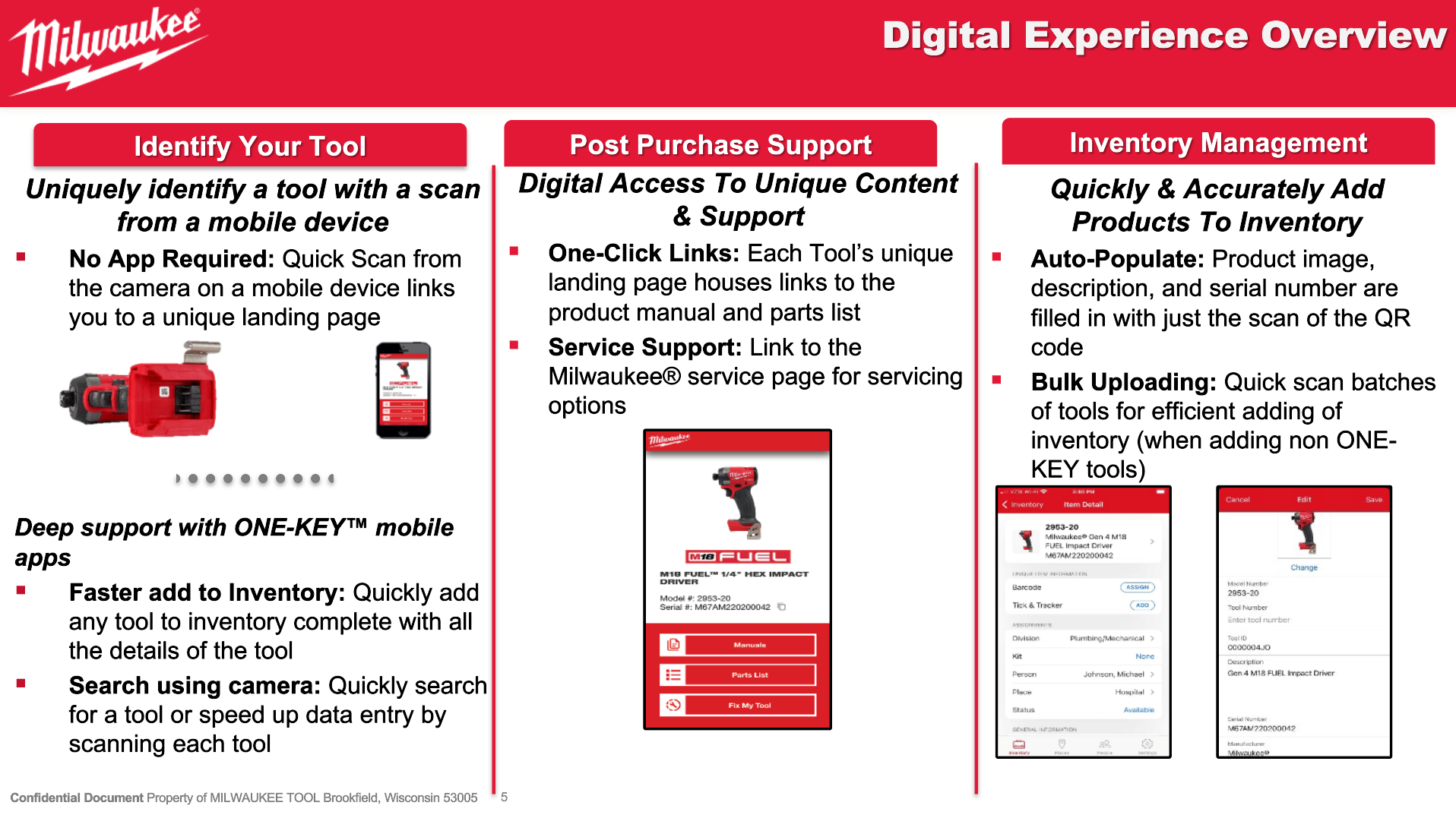
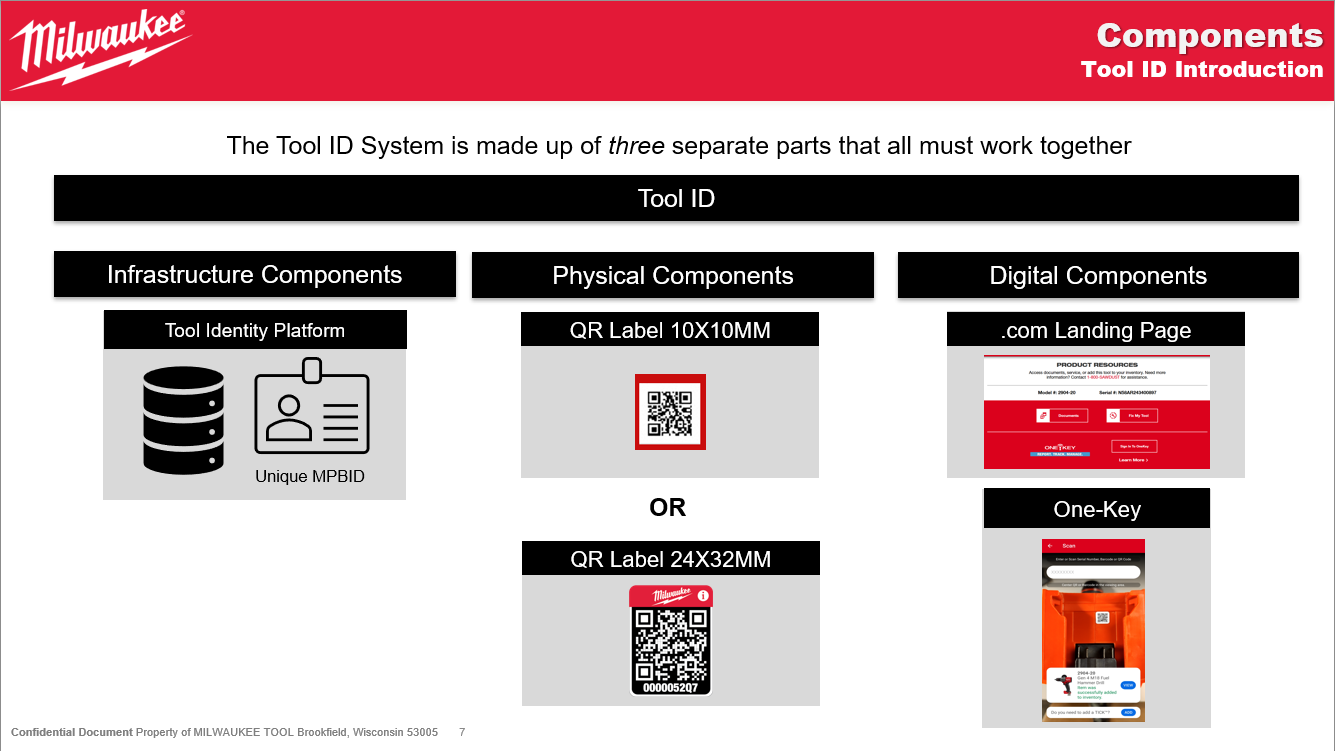
During the manufacturing process, data linking a specific QR code to a tool's digital record is sent to the JEDI manufacturing APIs. This linked data is then stored within the JEDI tool record services along with all other data related to a given tool and product.
Overall Architecture
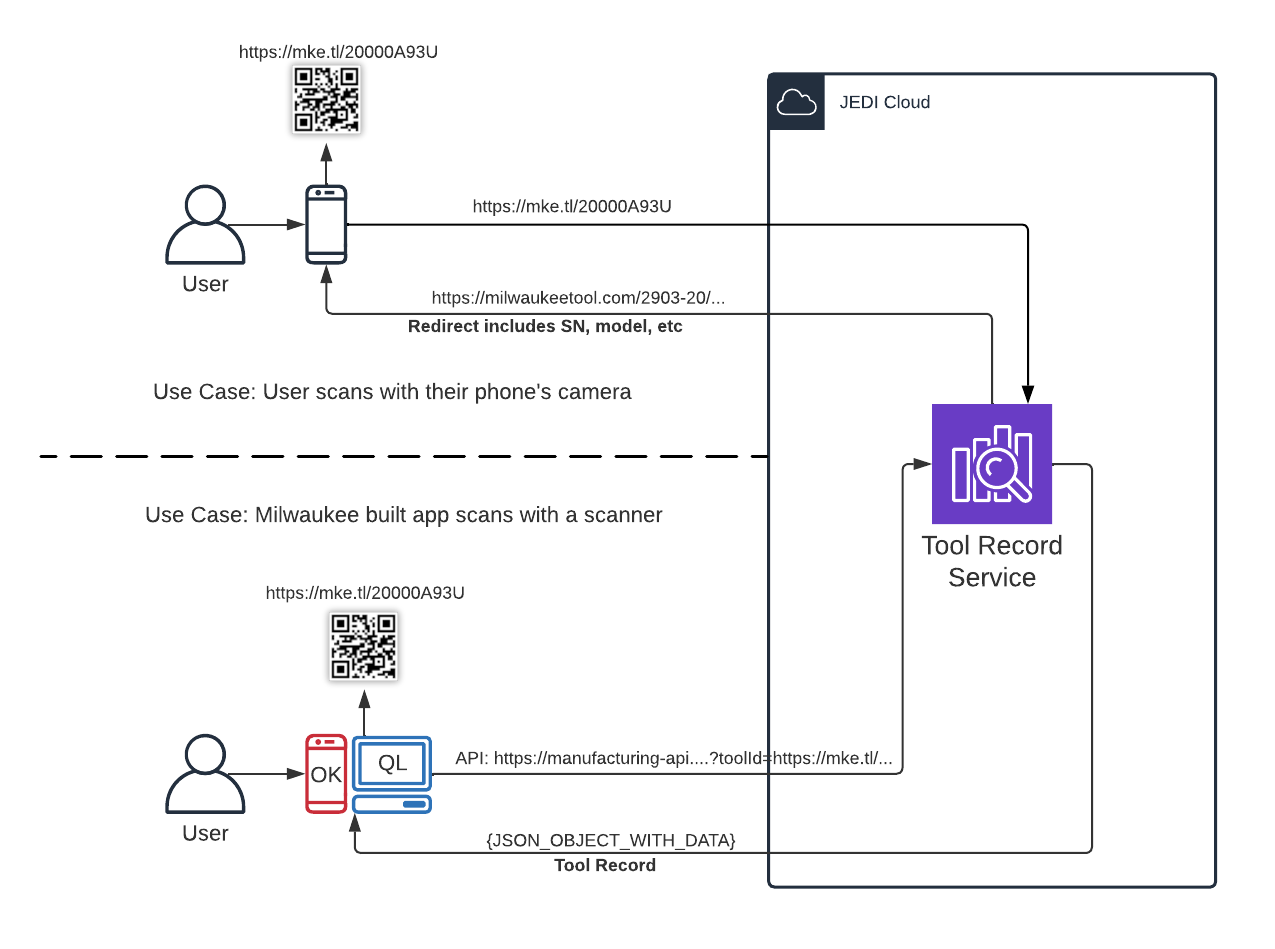
Data Integration & Access
There are two primary means of accessing data related to a Tool ID enabled tool:
1. Native Mobile Camera Scan
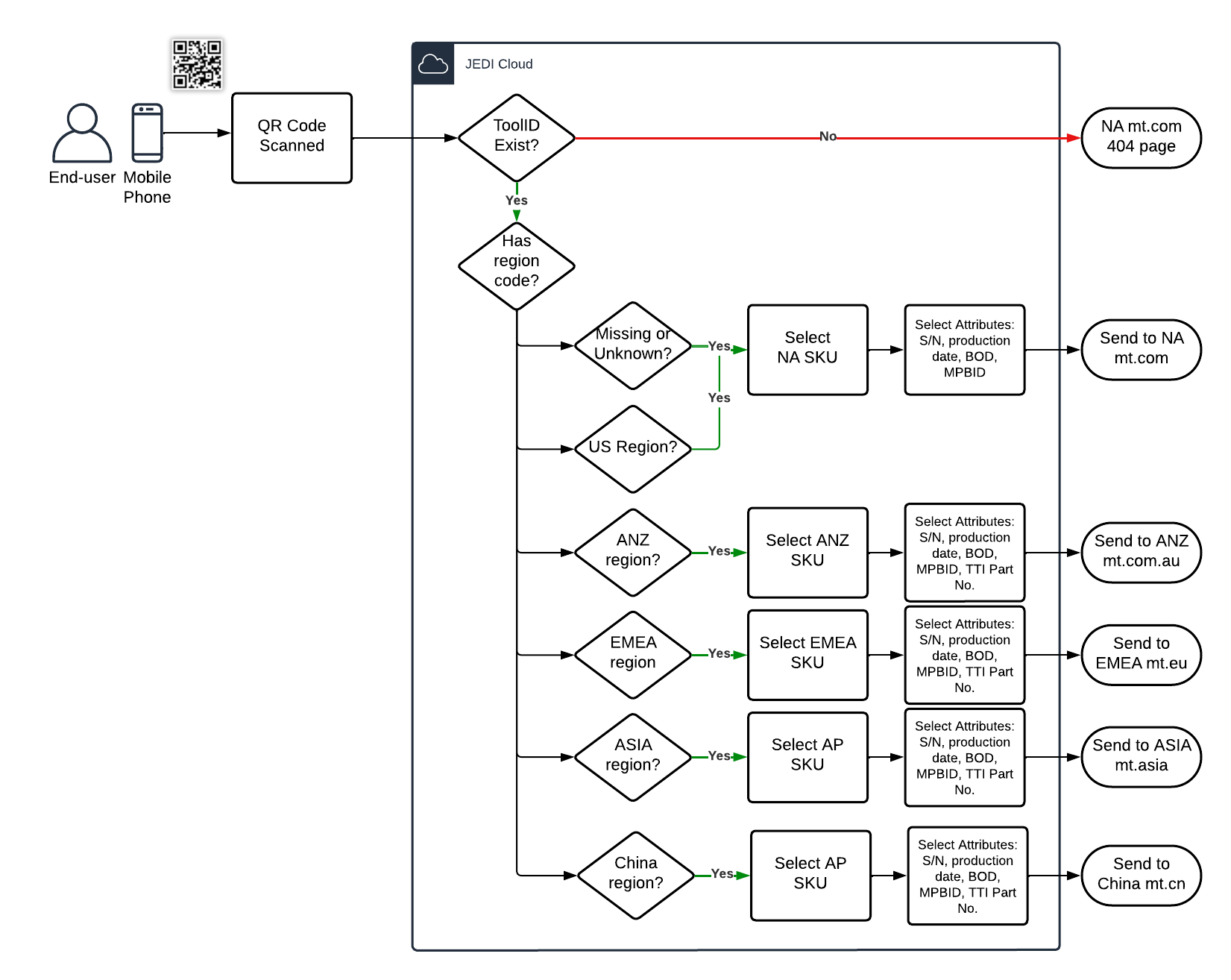
The first is via the URL embedded within the QR code. When a user scans the QR code with their camera, their phone will attempt to navigate their web browser to that page. That URL connects to our tool record service, locates the data related to the QR code, and redirects the user to the appropriate marketing product page based on digital tool record data.
This flow is shown below; see Current Region Routing Rules for routing group details.
2. System to System Integration
The second is via integration with our tool query API. In this case, authorized software systems can connect to the query API and request data about a specific tool or tools based on the unique Tool ID URL, MPBID, or Serial Number. With this data, software systems can take further action specific to their use cases such as displaying tool data to a service technician or quickly adding a tool to their One-Key inventory.
API details can be found in the API documentation section of this site located here.
Set Up Details
The QR code is embedded with a unique Tool ID in the form of a URL. When scanned with your phone, you will be redirected to a marketing product page specific to the region the tool was built for. This could be milwaukeetool.com for NA tools, milwaukeetool.eu for EMEA tools, etc. As part of the redirect flow, we transfer the model details to those marketing sites, so they may adequately determine which product’s details to display. If the value is incorrect, those systems may display either the wrong or no product details.
In order to ensure data consistency, the region-specific model/SKU number should be present before any tool builds. To verify this information is accurate, navigate to the Products page within QuickLink.
For information on the product setup process, please see the Responsibility & Process section of the site.
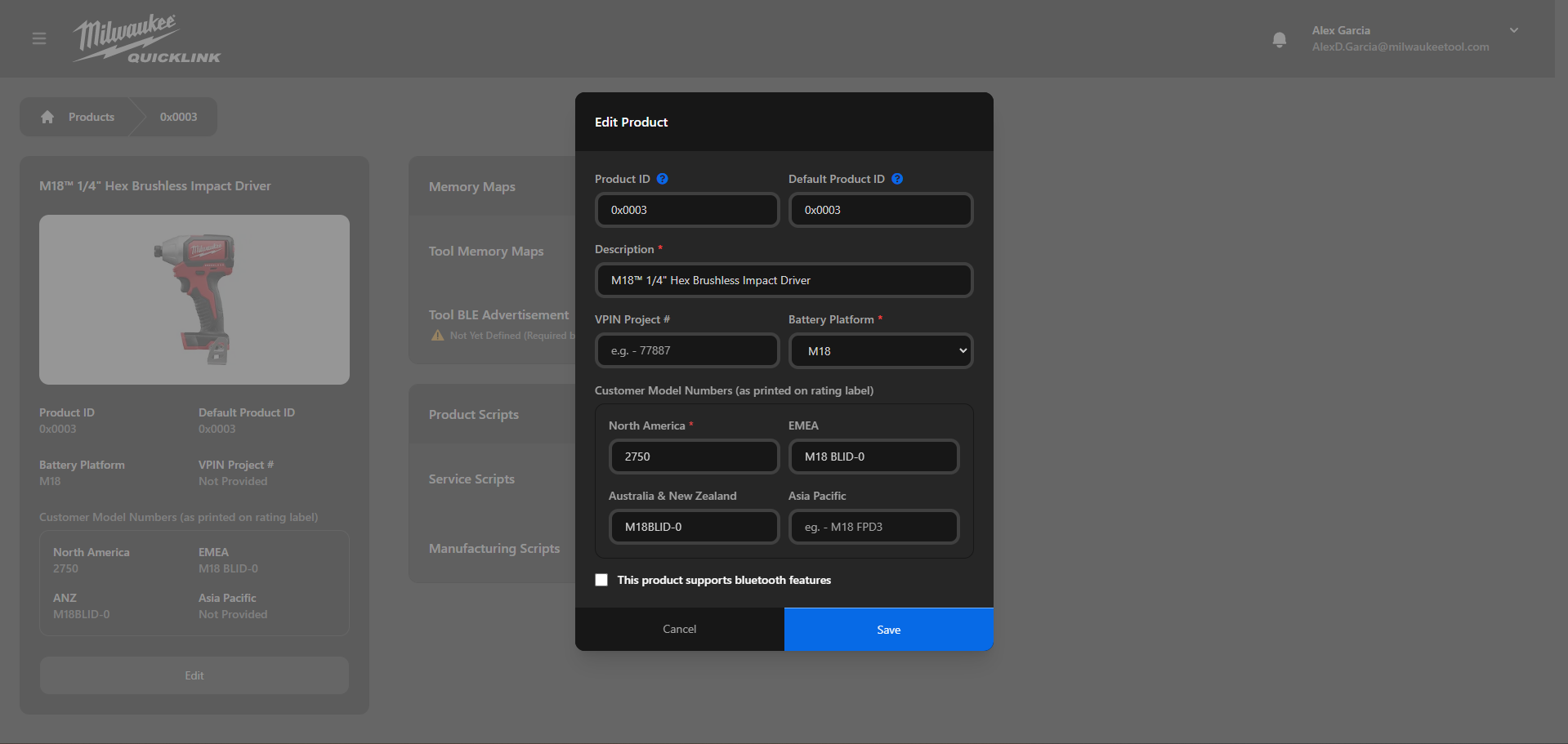
The region-specific Model Numbers should match what is printed on the rating label exactly, including any spaces. If any changes are made to the SKU details after manufacturing has begun, the change will propagate throughout the JEDI system, ensuring that all existing tool records reflect the changes made.
Data Ingestion
The primary means of linking a Tool ID QR Code to a digital tool record is via the POST v2 Tool Records API. This API takes a minimum of a unique MPBID for the tool and timestamp along with numerous optional fields and updates the digital record accordingly. In the case of Tool ID, the manufacturing system would provide the value of the Tool ID QR code in the request so it can be stored in the appropriate JEDI systems and made available for access via the redirect and query APIs.
In order for the Tool ID system to function as expected, the minimum data required during manufacturing includes the following data points
- MPBID
- Tool ID URL
- TTI Part Number
- Serial Number
- tool region code
- Born on Date
- A properly configured product with accurate SKU details. (see Setup Details)
Additionally, further details on using this API can be found at the Manufacturing API Examples and Data Strategy pages.
Current Region Routing Rules
The following table outlines the current routing rules based on the tool region code provided during manufacturing.
| Tool Region Code | Redirect Domain |
|---|---|
US, UL, USA, CAN, LATAM | milwaukeetool.com |
CN | milwaukeetool.cn |
TAC, KR, TW, SA, AZN, MSH, SEA, JP, ASIA, APJ | milwaukeetool.asia |
EMEA, EU, UK, ME, DK, FR, KSA | milwaukeetool.eu |
ANZ, NZ | milwaukeetool.com.au |
| All others / Unknown | milwaukeetool.com |
Data Access
To systematically access data for a Tool ID tool, clients can make use of the GET v1 Tool Records API. For authorized systems, they can provide a list of one to many Tool ID values, MPBIDs, or Serial Numbers and be provided back the digital record for any found tool. The level of information provided will vary by the amount of access provided to the client. For instance, only select clients will be allowed to access sensitive data such as passwords for a tool, but all clients are able to see basic information such as serial numbers, model numbers, and so forth.
Additionally, further details on using this API can be found at the Manufacturing API Examples and Data Strategy pages.
Support
Use the following process to request support for Connected Product Platform (JEDI) or Tool ID digital services. Examples of Support Requests:
- Questions about digital implementation (e.g., API integration, configuration)
- System errors or defects
- Feature enhancement requests
Short-Term Support (Pre-Q3 2026)
- Email quicklinksupport@milwaukeetool.com
- Include a description of your request
- Team will triage and contact as needed
Long-Term Support (Starting Q3 2026)
- Navigate to ServiceNow
- Search for “Connected Product Platform”
- Complete the form:
-
- Select Manufacturing / Traceability / Tool ID under “Area or Focus”
-
- Provide requested details